Choose your spot
Place a compatible Android phone where you want to monitor, with a clear view and a power connection.
A NEW PURPOSE FOR YOUR OLD ANDROID
Turn a spare Android phone into a security camera. Capture motion and keep the moments that matter in your own Google Drive.
Made for Android · Currently in development
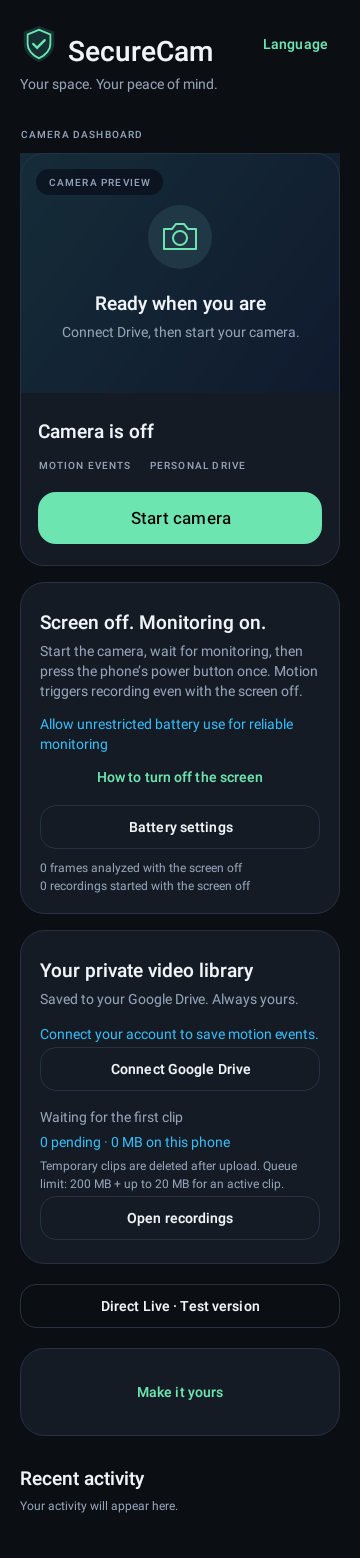
MEET SECURECAM
FROM DRAWER TO CAMERA
A simple setup, built around the phone you already have.
Place a compatible Android phone where you want to monitor, with a clear view and a power connection.
Connect your Google account to save clips to the app’s dedicated folder in your personal Drive.
Motion triggers a video recording. Clips are queued for upload so you can review them in Drive.
FOCUSED ON WHAT MATTERS
For the home, a private office, or a corner you want to keep an eye on.
Motion detection starts a video clip, helping you find activity without reviewing hours of an empty room.
Recordings upload to your Google Drive. Storage uses the available space in your Google account.
A clear interface in Hebrew and English. Built for compatible phones running Android 7 or later, with device testing still in progress.
A FEW THINGS TO KNOW
Not yet on Google Play. SecureCam is in development. This page will link directly to the store once the app is published.
A compatible Android phone, power, an internet connection for uploads, and a Google account with available Drive storage. Final device compatibility will be confirmed for launch.
Clips are temporarily stored on the camera phone and uploaded to a dedicated folder in your Google Drive. If an upload fails, the app queues it for another attempt.
Direct live viewing is experimental. It has worked on the same Wi-Fi network in testing, but viewing across different networks is not ready for general use.
Launch pricing has not been set. The price and any subscription terms will be shared before launch.
YOUR OLD PHONE HAS MORE TO GIVE
SecureCam for Android. Coming soon to Google Play.